Showing posts with label Info. Show all posts

Wednesday, 11 May 2016

Carl Burton's Surreal GIFs

Surreal Monochromatic GIFs by Carl Burton


tumblr_o515shCl8I1r4dhkuo1_500


Digital artist and animator Carl Burton creates quick atmospheric GIFs that blend elements of science fiction and surrealism. Glittering illuminated tentacles appear to twist through the dark while neon lasers emerge from deep pools of water. Much of what you see here represents Burton’s personal experiments, but the NYC-based creative also lends his illustrative style to images for long-form publications around the web. He works primarily with Cinema 4D, Photoshop, and After Effects, spending several hours or even days on a single GIF depending on its complexity. You can see more of his work on Tumblr. 
4ad71636670749.5724cb5feab7e
8cf8e436670749.5724cb5e8ab65
9f44c936670749.5724cb5e027cc
d7fd6b36670749.5724cb60c578a
tumblr_nwg0epo2Mg1r4dhkuo1_500
tumblr_o2i25gW0Aa1r4dhkuo1_500

Friday, 6 May 2016

Duograph Makes Pretty Spiral Patterns a Snap

Infinite Geometric Designs With the DuoGraph, a Compact New Drawing Machine by Joe Freedman


top

The 
DuoGraph is the latest drawing machine from inventor and designer Joe Freedman whose Cycloid Drawing Machine took the internet by storm a few months ago. His elaborate devices are capable of producing amazing geometric patterns akin to a Spirograph on steroids. This new creation is quite a bit simpler to setup and use, relying on 7 gears and a number of parameters that can be changed quickly to produce infinite designs. While the DuoGraph is a bit more limited in its level of customization, it’s capable of producing elaborate Lissajous patterns which the larger device cannot. Learn more about it on Kickstarter.


Thursday, 31 March 2016

Creative Graphic Calligrams by Ji Lee

Clever Calligrams That Visualize The Meanings Of Various Words

New York-based designer Ji Lee started creating calligrams 20 years ago in his typography class at art school. What started as an assignment turned into a lifelong hobby and Lee’s passion for typography has led him to create over a 100 calligrams so far. The challenge, says Lee, is to visualize the meaning of a word, using only the graphic elements of the letters forming the word. It’s not easy but the reward of ‘cracking’ a word keeps him going. Lee’s work has been featured in leading publications and he’s even published a book titled Word as Image. Check out some of his calligrams below.

Wednesday, 16 March 2016

Game Of Thrones Fans Unite: Baby Dragons Are Hatching In Slovenia

Baby Dragons will soon Hatch in Slovenia

Baby Dragons
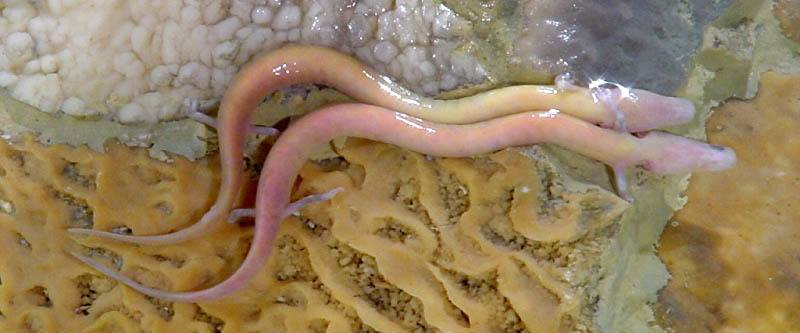
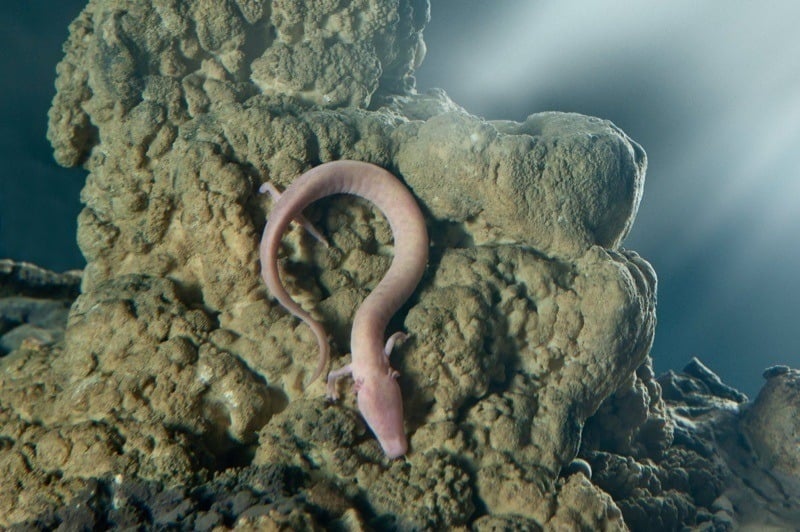
Olm cave salamanders, known as “baby dragons,” are found deep in the dark caves of Europe.
Game of Thrones fans eagerly awaiting season six now have something in the real world to get excited about: Slovenia’s “baby dragons.”
Biologists in Slovenia are preparing for a new brood of olms, cave salamanders known locally as “baby dragons,” to hatch deep in a minimalist aquarium in a dank European cave.
The olm is the continent’s only cave-adapted vertebrate, and only reproduces once every six or seven years. So, when a new brood of 57 eggs was laid in January, scientists and tourists alike crowded into the cave in the hopes of being the first to witness the newest batch of baby dragons.
Olm Salamander
A quick glance at an olm is all it takes to understand the myth and mystery surrounding these creatures. Olms have a thin, snake-like body, short and stubby legs, and frilly fan-like gills protruding from each side of the head. It’s blind (baby olm’s eyes atrophy after about four months) so it hunts worms, insects, and snails using only its senses of hearing and smell. In addition to their keen ears and noses, olms have evolved to detect electric and magnetic fields.
It’s no wonder 15th century humans once believed that the olm was the offspring of dragons.


“People had never seen it and didn’t know what it was,” biologist Saso Weldt told the Christian Science Monitor. “During the winter time, clouds of fog often rose from the cave, so they came up with stories of a dragon breathing fire from the cave, and they thought the olms were its babies.”
Sure, the species can’t breathe fire and they only grow to about 10 inches long, but they can live for 100 years and survive 10-year spans without food. But rubbernecking birthers shouldn’t get too excited about seeing new hatchlings anytime soon — it could take another four months before new babies emerge. There’s also the possibility that the eggs won’t survive long enough to hatch. The last known time an olm laid eggs, the mother’s cannibalistic tendencies cut her hatchlings’ lives short.
This time, however, the waiting biologists are prepared and ready to see these “baby dragons” grow to adulthood.

Monday, 14 March 2016

18 Hidden Mac Tricks You May Not Know

18 Hidden Mac Tricks You May Not Know

New study space additions: an adorable succulent from IKEA and a space-themed wallpaper I designed myself. Hopefully my tiny friend won’t die and hopefully I’ll remember the planets of the solar system. Here’s hoping!Wallpaper available here:...
Every operating system has its own hidden quirks that aren't obvious at first, only way to usually find them is to read the manual but really no one ever reads the manual thoroughly. When you buy a Mac, you aren't even given a manual in the box, you have to go find it on Apple's support site.
The Mac has always had some awesome tricks that not everyone knows. Here are some not so obvious things you can do with your Mac.
1. Ctrl + Cmd + Spacebar brings up the full emoji keyboard.
2. Cmd + ~ allows you to quickly switch through windows on the current application you're on.
3. Shift + Option will give you the ability to more finely adjust the volume.
4. Holding down Shift when changing the volume will mute the volume clicker.
5. Cmd + L will highlight the URL bar in your browser.
6. Cmd + Shift + 3 will take a screenshot.
7. Cmd + Shift + 4 will let you take a cropped screenshot.
8. Cmd + Shift + 4 + Spacebar will let you take a screenshot of a specific window.
9. Using 'Preview' you can digitally sign documents.
10. Cmd + Option + Shift + V will give you the ability to paste text with formatting.
apple, ipad, and imac image
11. Option + Right-Click on some things will bring up an extra contextual menu.
12. Option + hitting on any of the keys above the numbers such as brightness or volume will bring up settings for that function.
13. Cmd + Spacebar will give you quick access to spotlight.
14. OS X has a built in dictionary. Simply highlight a word, right click then hit 'Look Up'. Trackpad users can do it by tapping on a word with three fingers.
15. Highlight multiple items then hit the Spacebar and it'll show them in Quick Look.
16. Cmd + H will quickly hide the windows for the current app you're on.
17. Alt + backspace deletes whole words instead of deleting single letters.
18. Holding down Shift while minimizing a window will minimize it in slow motion.
If you have any other awesome tricks to share, make sure to leave them in the comments below!

Tuesday, 8 March 2016

GIFs Which Make You Say WOW

More and More GIFs.......

When work-day stress begins to creep up on you, it's nice (and necessary) to take a momentary mental break.
If you spend most of your days at the computer, one of the quickest ways to find calm and composure is to refresh your brain with a quick palate cleanse. The subreddit r/oddlysatisfying features a collection of GIFs and photos that are so inexplicably gratifying, you'll find yourself transfixed for hours.